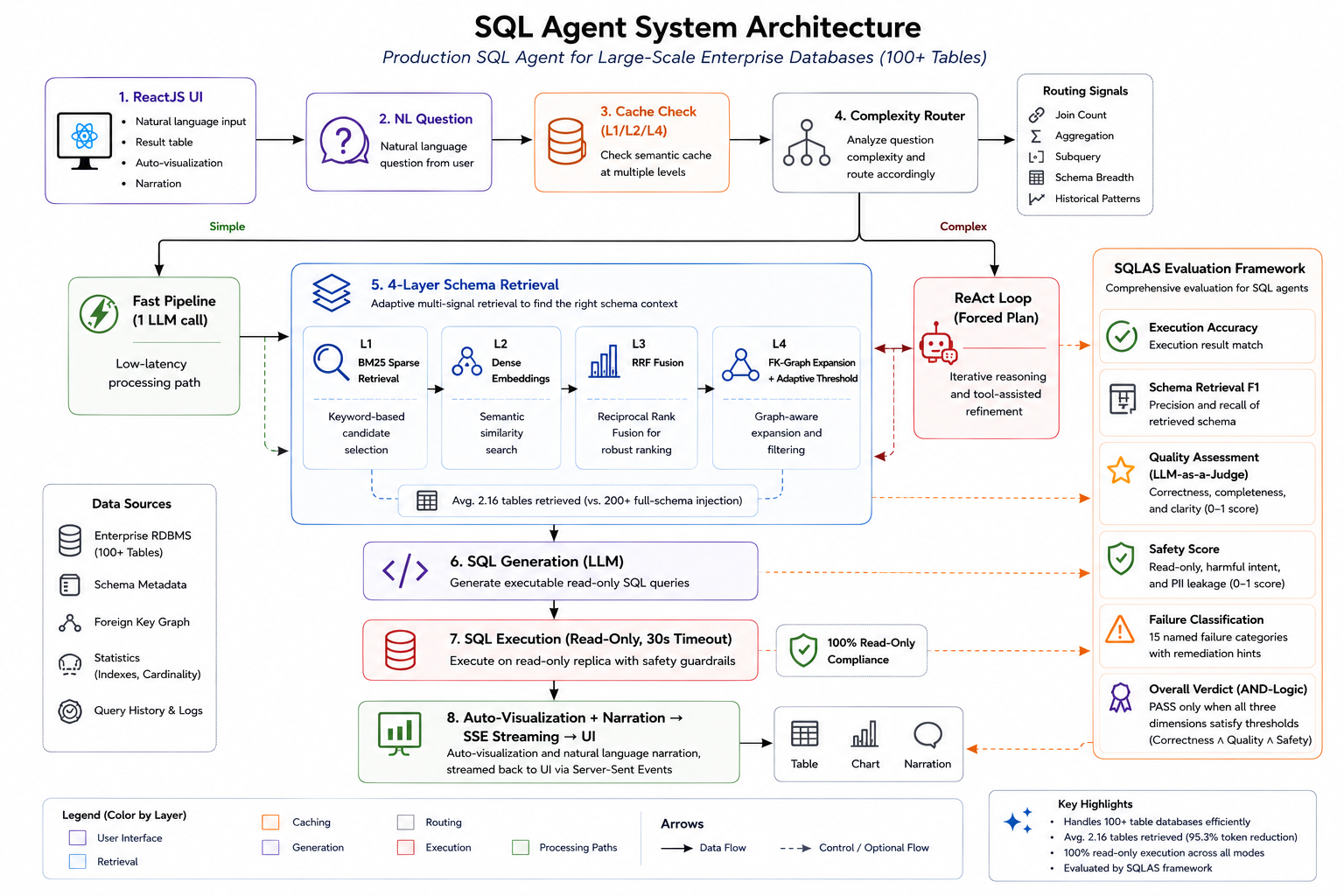
Ask a question in plain language. NexusSQL writes the SQL, runs it, and hands back the answer with a chart. Every query also gets a score from SQLAS, so you know which results to rely on.
Both live in the same repo, so you can measure how good the answers really are.
The engine. It turns a question into SQL, runs it, and explains the result with a chart. Every step is traced.
The scorer. A small library that grades how well a SQL agent did its job. Install it with pip install sqlas.
Each question is answered, cached, and checked for safety before you see the result.
Run a quick single pass, or let the agent plan, check the schema, and fix its own mistakes as it goes.
Big database? It finds the tables that matter and leaves the rest out of the prompt.
A separate service picks the chart, whether that's a bar, a line, or just a number. It runs on the side and never slows an answer down.
It blocks writes, catches SQL and prompt injection, and checks for exposed PII. No LLM call needed.
It caches both the questions and their results. You can see the hit rate and how many tokens it saved.
Every query is logged: how long it took, how complex the SQL was, and whether the user liked the answer.
Each tenant gets its own table access and row filters. Nobody sees data that isn't theirs.
Watch each step show up in the UI as it runs, over a simple SSE stream.
An endpoint that warns you when answer quality starts to slip.
Pick speed or depth on each request. The agentic mode is one flag away.
One fast pass, good for clear questions. It's cached and quick, so it works well for dashboards and queries you run a lot.
For trickier questions. The agent works in steps, checks the tables, and corrects itself before it answers.
Docker brings up all three services in dependency order. Open http://localhost and you're live.
Grab the repo and step in.
Copy .env.example → .env and add your Azure OpenAI keys.
One docker compose command starts everything.
# 1. Clone
git clone https://github.com/thepradip/NexusSQL.git
cd NexusSQL
# 2. Set credentials
cp backend/.env.example backend/.env
# edit backend/.env: AZURE_OPENAI_ENDPOINT, AZURE_OPENAI_API_KEY, AZURE_OPENAI_DEPLOYMENT_NAME
# 3. Start everything (viz → backend → frontend)
docker compose up --build
| Container | Port | Role |
|---|---|---|
| ariasql-visualization | 8011 | Chart inference microservice |
| ariasql-backend | 8000 | SQL AI agent API + MLflow |
| ariasql-frontend | 80 | React UI |
# Starts all three services:
# visualization (8011) → backend (8000) → frontend dev (5173)
bash start.sh
python -m uvicorn services.visualization_service.app:app --host 127.0.0.1 --port 8011
cd backend && uvicorn main:app --port 8000
cd frontend && npm run dev
POST /query gives you the SQL, the data, a written answer, a chart, and timing. Full docs live at /docs.
curl -X POST http://localhost:8000/query \
-H "Content-Type: application/json" \
-d '{"query": "How many patients were admitted last month?"}'
{
"sql": "SELECT COUNT(*) FROM admissions WHERE ...",
"data": { "columns": ["count"], "rows": [[142]], "row_count": 1 },
"response": "142 patients were admitted last month.",
"visualization": { "type": "number", "number_value": 142, "number_label": "Count" },
"agent_mode": "pipeline",
"metrics": { "total_latency_ms": 1240, "cache_hit": false }
}
curl -X POST http://localhost:8000/query \
-H "Content-Type: application/json" \
-d '{
"query": "Which departments have the highest readmission rates?",
"force_agentic": true
}'
# → plan → describe tables → execute SQL → self-correct → answer
| Method | Endpoint | Description |
|---|---|---|
| GET | /health | Service health + table list |
| GET | /schema | Full database schema |
| POST | /query/stream | SSE streaming, stages in real time |
| POST | /feedback | Thumbs up/down on a trace |
| GET | /cache/stats | Cache hit rate, tokens saved |
| POST | /export/csv | Download results as CSV |
| POST | /database/test | Test a new database connection |
| GET | /drift/status | Production drift monitoring status |
A RAGAS-style library for SQL agents. It lines up with the Spider, BIRD, RAGAS, and MLflow standards. pip install sqlas
from sqlas import evaluate
def llm_judge(prompt: str) -> str:
return openai_client.chat.completions.create(
model="gpt-4o", messages=[{"role": "user", "content": prompt}]
).choices[0].message.content
scores = evaluate(
question = "How many active users?",
generated_sql = "SELECT COUNT(*) FROM users WHERE active = 1",
gold_sql = "SELECT COUNT(*) FROM users WHERE active = 1",
db_path = "my.db",
llm_judge = llm_judge,
response = "There are 1,523 active users.",
)
print(scores.overall_score) # 0.95
print(scores.verdict) # PASS
print(scores.hardness) # "easy"
print(scores.to_markdown_report()) # paste into a PR comment
from sqlas import evaluate_correctness, evaluate_quality, evaluate_safety
c = evaluate_correctness(question, sql, llm_judge, gold_sql=gold, execute_fn=db)
q = evaluate_quality(question, sql, llm_judge, response=text, result_data=data)
s = evaluate_safety(sql, question=question, pii_columns=["email", "ssn"])
print(c.score, c.verdict) # 0.85 PASS (threshold 0.5)
print(q.score, q.verdict) # 0.72 PASS (threshold 0.6)
print(s.score, s.verdict) # 0.45 FAIL (PII detected, threshold 0.9)
# PASS only when ALL THREE dimensions clear their thresholds.
# evaluate_safety() makes zero LLM calls: pure regex + sqlglot AST.
from sqlas import classify_failure
analysis = classify_failure(
sql = "SELECT id FROM users LIMIT 100",
scores = {"execution_accuracy": 1.0, "row_count_match": 0.12},
details = {"row_count_match": {"pred_count": 100, "gold_count": 839}},
)
print(analysis.primary) # FailureCategory.LIMIT_TRUNCATION
print(analysis.top_hint()) # "Remove LIMIT, the question asks for full results, not top-N"
from sqlas import run_suite, generate_report, WEIGHTS_V4, build_schema_info
tables, columns = build_schema_info(db_path="my.db")
results = run_suite(
test_cases = test_cases,
agent_fn = my_agent,
llm_judge = llm_judge,
execute_fn = execute_fn,
valid_tables = tables,
valid_columns = columns,
weights = WEIGHTS_V4, # agentic ReAct profile
pass_threshold = 0.6,
)
print(generate_report(results, format="markdown")) # → PR comments
print(generate_report(results, format="json")) # → artifacts
| Weight profile | Metrics | Best for |
|---|---|---|
| WEIGHTS | 15 | Standard NL→SQL pipeline |
| WEIGHTS_V2 | 20 | + RAGAS context quality |
| WEIGHTS_V3 | 30 | + Guardrails + visualization |
| WEIGHTS_V4 | 28 | + Agentic quality (ReAct agents) |
Run it and check its quality, all from one repo.